Account Recovery: Difference between revisions
From IUO Tome of Knowledge
No edit summary |
No edit summary |
||
| Line 2: | Line 2: | ||
* You will be prompted to enter an Email Address and/or a Discord name | * You will be prompted to enter an Email Address and/or a Discord name | ||
* You are NOT required to do this, but if you do, it makes it easier for us to reset your password | * You are NOT required to do this, but if you do, it makes it easier for us to reset your password or recover your account if something were to happen | ||
* If you fill out at least one of them, you will no longer be prompted at login. | * If you fill out at least one of them, you will no longer be prompted at login. | ||
* If you do not want to fill out either and don’t want to be prompted at login, simply enter “DECLINE” in the email address field and it will stop bugging you. | * If you do not want to fill out either and don’t want to be prompted at login, simply enter “DECLINE” in the email address field and it will stop bugging you. | ||
Revision as of 23:57, 14 October 2025
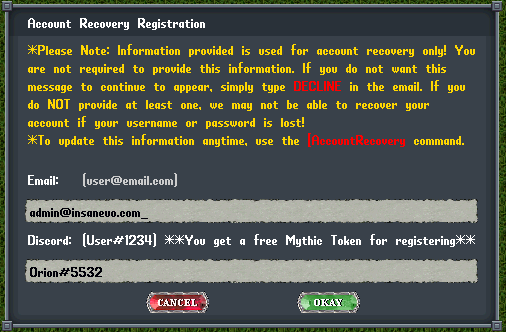
- You will be prompted to enter an Email Address and/or a Discord name
- You are NOT required to do this, but if you do, it makes it easier for us to reset your password or recover your account if something were to happen
- If you fill out at least one of them, you will no longer be prompted at login.
- If you do not want to fill out either and don’t want to be prompted at login, simply enter “DECLINE” in the email address field and it will stop bugging you.
- Email addresses must be provided in the appropriate format (Example: [email protected])
- Discord names should work with the new format, if not try including the # and the 4-digits after (Example: user#0000)
- If you link up your Discord, you will receive a free Mythic Character Token in your backpack (or bankbox if your backpack is full)!
- You can now change your password using the
[passwordcommand (Example: [password my-new-password my-new-password ) - You can use the
[AccountRecoverycommand if you would like to have this prompt appear again

